Automate 60–80% of VA Tasks: Hybrid Plan for Real Estate Investors
A cost-minded hybrid playbook to automate 60–80% of repeat VA tasks. Migrate workflow by workflow with human checkpoints and a SendMLS case study.
Automate 60–80% of VA Tasks: Hybrid Plan for Real Estate Investors

Roughly 60 to 80% of a virtual assistant’s structured, repeatable work can be automated with tools available right now, according to practitioner teardowns. The smart move isn’t a full swap. Migrate one workflow at a time, keep a human checkpoint on anything involving money or judgment, and expect faster turnaround at lower cost, with the real risk sitting in relationship and edge-case failures if you automate too fast.
TL;DR:
- Automatable tasks like scheduling, email triage, data entry, and reminders are highly predictable and can be reliably handled by existing automation tools.
- Tasks requiring judgment, discretion, financial decisions, or ambiguity should remain human to avoid errors and legal risks.
- A safe migration involves auditing current tasks, automating low-stakes workflows first, and running parallel tests for 7 to 14 days before full adoption.
- Setup costs range from 15 to 30 hours with ongoing monthly maintenance of 1 to 3 hours, and automation becomes cost-effective when monthly savings outweigh initial setup and labor costs.
- SendMLS automates structured real estate offer tasks, such as contract population and email sending, while keeping humans in the approval and follow-up process.
Table of Contents
- Which VA Tasks Automate Reliably
- Which VA Tasks Should Stay Human
- How Do You Migrate From a VA to Automation Safely?
- What Does It Cost, and When Does It Pay Off?
- How SendMLS Automates a Real VA Workload
- What I’d Tell Anyone Starting This Migration
- Replace the Manual Part of Your Offer Workflow With SendMLS
- Sources
Which VA Tasks Automate Reliably
The tasks that automate cleanly share one trait: they’re structured, repeatable, and reversible if something goes wrong. O*NET’s task breakdown for administrative roles lists scheduling, email management, data entry, and filing as core duties, and those four map almost directly onto today’s best automation candidates.
Here’s where to start, ranked by how confident you can be in the result:
- Scheduling and calendar coordination. Tools like Calendly or Cal.com paired with a workflow builder handle booking, rescheduling, and reminders with almost no error rate.
- Inbox triage and templated replies. Draft-for-approval setups sort routine messages and write first-pass responses, leaving a human to hit send.
- Data entry and CRM updates. Zapier, Make, or n8n move information between forms, spreadsheets, and CRMs without a person retyping anything.
- Follow-up sequences and reminders. Time-based triggers handle the “did you see this” nudges that used to eat a VA’s afternoon.
- Research digests and report generation. Scheduled pulls compile pricing data, listing changes, or market updates into a standing report.
- File organization and naming. Rule-based scripts rename, tag, and sort documents the instant they land in a folder.
Every one of these is deterministic. Feed it the same input twice, get the same output twice. That’s exactly the property that makes an automation trustworthy instead of a liability.
Which VA Tasks Should Stay Human
Automation breaks down the moment a task requires judgment instead of rules. Agent capability analyses consistently find that automated systems handle short, rule-based, reversible work well and fail on anything long, ambiguous, or high-stakes.
Three categories belong to a person, full stop:
- Judgment and discretion. Negotiation, client representation, and any sensitive communication where tone and timing matter more than speed.
- Money and contracts. Anything that moves funds or commits you legally needs a human set of eyes before it goes out.
- Ambiguous or one-off tasks. If a task hasn’t repeated at least a few times in the same shape, it’s not ready for automation yet. Wait for the pattern.
Two rules keep this simple: never let an automation auto-send to a named individual without a review step, and queue anything involving money for manual approval before it fires.
Pro Tip: Build your escalation rule before you build the automation itself. Decide what happens when the system hits something it can’t classify, then code that path first.
How Do You Migrate From a VA to Automation Safely?
A staged migration protects you from the two most common failure modes: automating something too ambiguous to standardize, and cutting VA hours before the replacement actually works.
- Audit your VA’s current task list. Write down every recurring task and tag each one automatable or not automatable, based on whether the inputs and outputs are consistent.
- Pick one low-stakes, high-frequency workflow first. Scheduling or data entry are the standard starting points because errors are cheap to catch and cheap to fix.
- Design the automation with explicit failure branches. Decide in advance what happens when an input doesn’t match the expected pattern, and route that case to a human instead of letting the system guess.
- Run it in parallel for 7 to 14 days. Keep your VA or yourself doing the task manually alongside the automation, then compare outputs and measure the error rate before trusting it solo.
- Scale once the run rate is stable. Add the next workflow only after the first one has gone a full parallel-run cycle with no unresolved errors, and set a standing 20-minute weekly review to catch drift before it becomes a pattern.
That weekly review is the piece most people skip, and it’s the piece that keeps an automation from quietly degrading over months without anyone noticing.
What Does It Cost, and When Does It Pay Off?
A VA typically runs $8 to $20 an hour depending on experience and location, while an automation stack for structured admin work usually lands in the range of $50 to $300 a month once you’re past setup. Setup itself takes 15 to 30 hours, with ongoing maintenance dropping to 1 to 3 hours a month after the first cycle stabilizes.
The math that matters: structured tasks like scheduling and data entry run at roughly 60 to 80% automation reliability with low failure rates. Ambiguous, judgment-heavy tasks land far lower, often not worth automating at all until they’ve repeated enough to become predictable.
To find your break-even point, divide your setup hours by your own hourly opportunity cost, then compare that to the monthly VA cost you’re offsetting. A founder whose time is worth $150 an hour breaks even in weeks. Someone billing $30 an hour might take a couple of months, which still beats paying for the same manual work indefinitely.
How SendMLS Automates a Real VA Workload
Real estate investors running 20 to 100+ offers a month are a clean case study, because the VA work is almost entirely structured: pull property details, fill a contract, send it, track it. SendMLS automates exactly that sequence. It populates a state-approved contract from county and MLS data, sends it from the user’s own Gmail so it lands as real paperwork instead of a text an agent ignores, and logs when the agent opens it.
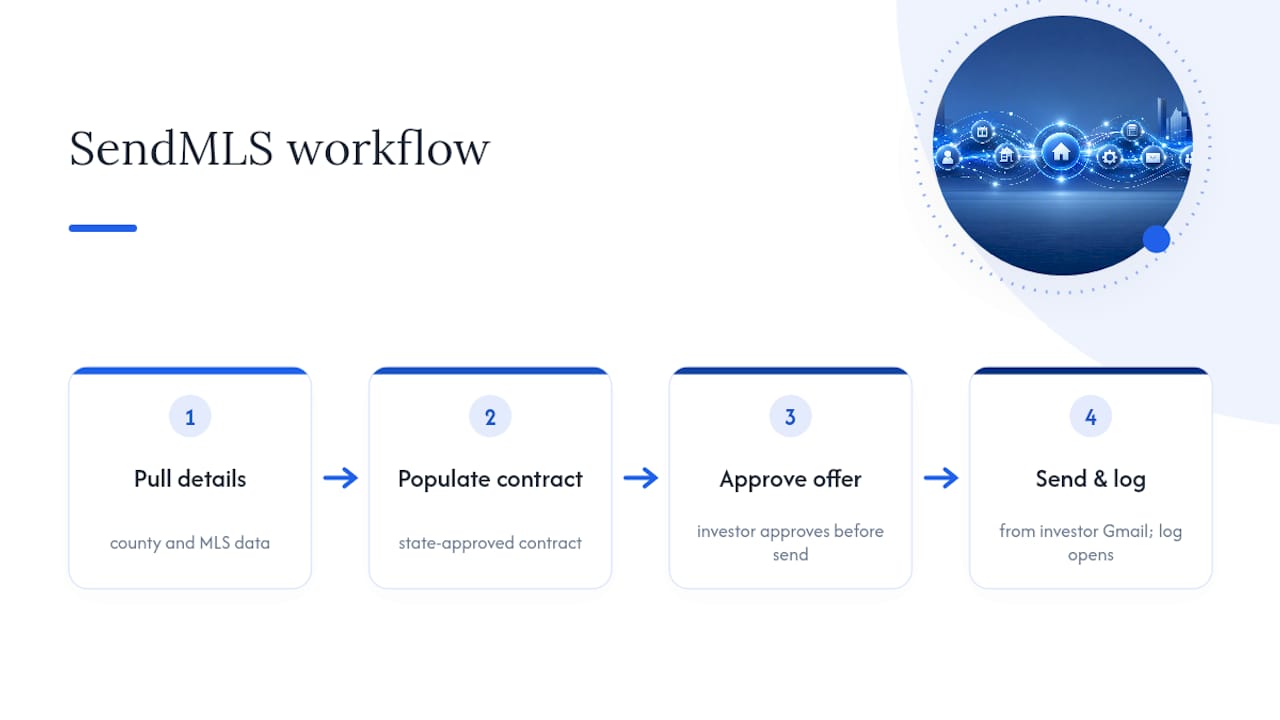
The human checkpoint stays intact. You still approve the offer before it sends, and open tracking tells you when to follow up instead of guessing. That’s the hybrid model in practice: the contract population and formatting that used to eat a VA’s whole afternoon happens in seconds, while the decision to make the offer and the follow-up conversation stay with you.
What I’d Tell Anyone Starting This Migration
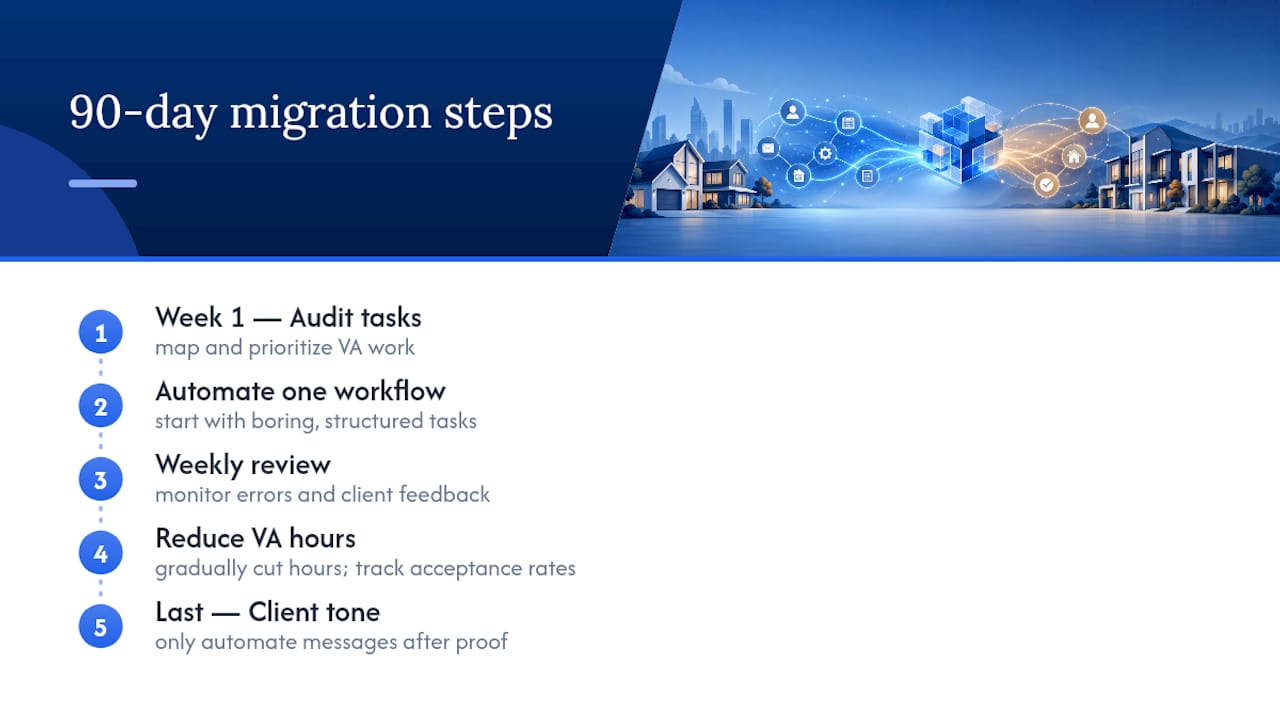
Staged automation with a human checkpoint isn’t a compromise. It’s the version of this that actually survives contact with real clients and real deals. I’d trust a 90-day plan over a weekend overhaul every time: audit your tasks in week one, automate a single workflow, run a weekly review, then reduce VA hours gradually while you track acceptance rates on whatever the automation touches.
The mistake I’d flag hardest: don’t hand your client-facing tone to automation on day one. Save that for last, after you’ve proven the boring, structured stuff won’t break. A bad calendar invite is forgivable. A cold, templated message to a client who expected a person is not.
— Shane
Replace the Manual Part of Your Offer Workflow With SendMLS
SendMLS is the automation layer for the exact VA tasks eating your time on high-volume offers: typing contracts, formatting them correctly, emailing them out, and tracking whether an agent even opened them.
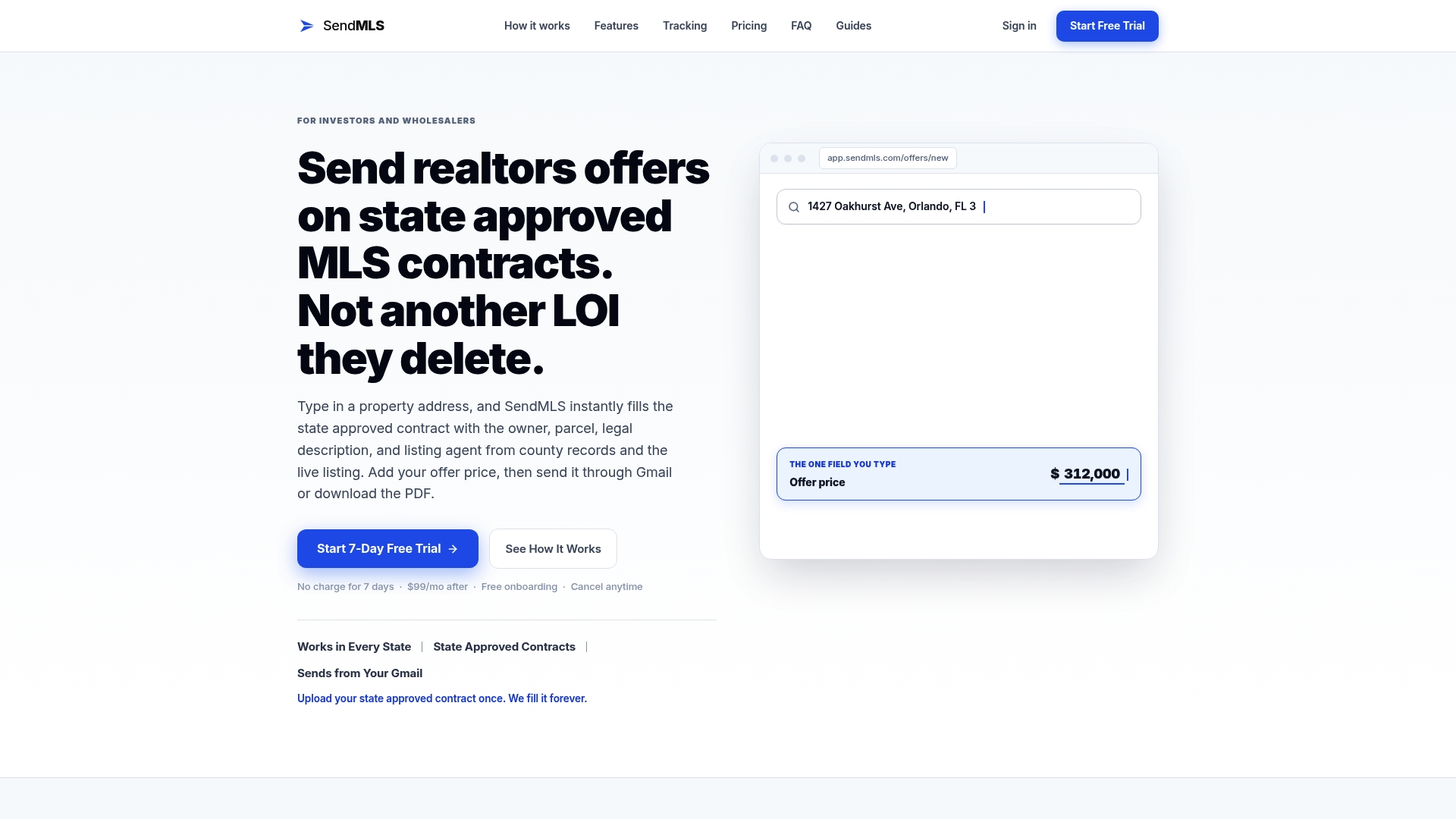
Instead of a VA in DocuSign or you burning 10 to 15 minutes per offer, SendMLS auto-fills a state-approved contract with the property details and sends it straight from your Gmail. You still approve every offer before it goes out and you still decide when to follow up, but the typing and formatting disappear. That’s the hybrid model this whole article argues for, built into one tool for one specific, repeatable job.
If you’re making enough offers a month that a VA’s hourly cost is starting to hurt, start a 7-day free trial and see how many hours it hands back.
Sources
- O*NET OnLine — Secretaries and administrative assistants
- Replacing a VA With AI Agents in 2026: What Actually Works (Real Costs) - Bright Curios
- Replace Your VA with AI Workflows: Solo Founder Playbook